concepts and chickens

Two random birdlike concepts. The left one started with some scribbles without much thought and it turned into a vaguely wrathlike thing, and it just developed from there.

It’s a ram
man

american buff chicken

I’ve been able to head out east a couple times recently, and took some photographs and videos of the farms there. I’m so happy to have my own source chicken material! Before this I only had the chicken encyclopedia. Though, the encyclopedia is great for exotic breeds of chickens, which we don’t have here. I believe this one is called an American Buff it’s a Buff Orpington. Incidentally, such a thing as an American Buff exists, but it is a goose and not a chicken. Wonder how I got that mixed up o.o

chicken

I’m not sure of the name of this one, it kind of looks like it could be a couple different breeds to me, need to find out (think I need to work on this image a little more, too). It looks like it could be a Cochin … ah, I need a chicken expert.

Oh! I have to talk about these chickens. So we met these chickens during an annual event that, out east, is known as, “Chicken Day.” :) It tickles me to say that we went to “Chicken Day,” haha. Anyway, it’s called that because it’s the time of the year when they have all the new hatchlings to sell. They’re shipped from the midwest, I think the hatchery is in Iowa or Ohio. So there were so many little chicks, they were sooo adorable :)

Then they also had a bunch of adult chickens, and asides from looking very healthy and happy, these were the tamest chickens we’ve ever seen! You could pet them and they would just kind of sit or squash down, letting you pet them. They were like dogs! Giant bird dogs! Ahaha.

Yes, I love chickens. It’s a … thing.

Moving on:

Another random concept

Testing another brush I made
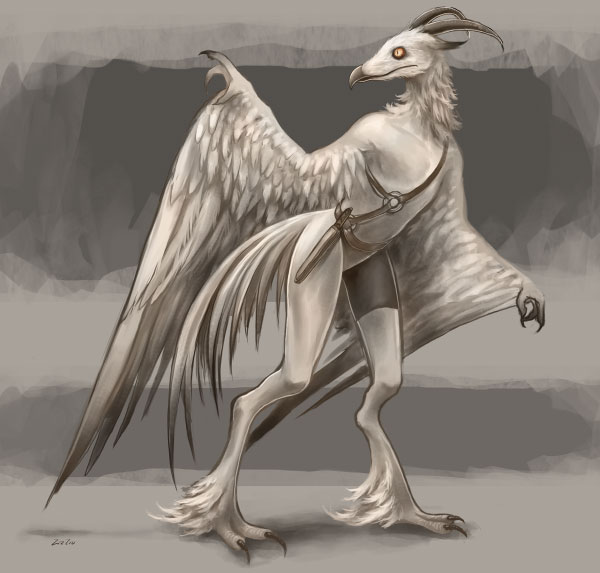
bird

Bird creature. It’s mostly done but it still needs some small refinements (mostly the hands). I’m trying to develop a design that merges a bird form with a human figure without it being extremely creepy. I did a colored one a while ago that was way too human, and it even creeped me out in the end haha. So now instead of the creature being mostly human with bird characteristics, I’m reversing the proportions so it is mostly birdlike, but with some of the bird features exaggerated so it looks more human, most noticeably adding a neck and removing the butt haha. And switching around the “drumstick” area of the leg. I wanted to have a noticeable keel bone but it didn’t look right here. I’ll do it in another one.

Oh and the wings. The idea here was to have the first three fingers show as fingers/toes, and the last two would form the fleshy part of the wing. So the whole arm would look like a chicken wing and not a human arm. Though it doesn’t really look that way, especially in the armpit area. Still need to figure out what will look best.

Also is the background too distracting? Here’s what it looks like without it:
Continue Reading

dragon fruit and magicpicker

Did a shortish dragon fruit still-life study tonight. I wasn’t planning to since I am extremely tired today, but I wanted to do a little in case they don’t look as fresh tomorrow. They are so gorgeous fresh. Ever since I painted the onion, I’ve been drooling to paint a dragon fruit. They have the most … I can only describe their forms as “visual appetizing.” I love them!

They also have much more complicated forms than an onion, and drawing one was more difficult than I thought it would be since it isn’t as common a shape. Maybe I will work on it some more tomorrow night so it looks as finished as the onion.

They also taste incredible. They have a texture similar to a kiwi and taste similar to a cross between a kiwi and some kind of berry. The center is sweeter than the outer parts of the flesh. The flesh of the fruit is either white or ruby-colored, and flecked with black seeds that look and crunch just like a kiwi’s. I’d like to paint a cut-up dragon fruit next!

MagicPicker Color Wheel

I also recently acquired a new color wheel for Photoshop that I adore! It’s Anastasiy’s MagicPicker Color Wheel. I’ve tried several color wheel plugins for Photoshop, and his is far and away the best one. It’s much faster than the other two I’ve tried and I am very happy I have it now. It noticeably speeds up my workflow in Photoshop when I use it, and feels very natural. I avoided using Photoshop for drawing before learning there even were color wheel plugins, actually, because it just wasn’t as much fun or intuitive to use as Paint Tool Sai’s or Painter’s color wheels.

That’s a main point, too – Anastasiy’s color wheel makes painting in Photoshop so enjoyable to use. It is refreshing to not have to open a color box or move three sliders, and to simply be able to visually and quickly choose a color and paint it on the canvas. I also like that his color wheel is resizable. You can make it as large or small as you want. It’s very flexible!

Lastly, I also like that it has the option to have a true, traditional RYB color wheel. All the other Photoshop color wheel plugins use a RGB color wheel, so it is less readily usable if you want to use the wheel for basic color theory. For example, using the RGB color wheel, it would show that the complement to red is cyan instead of what it should be in real life – green. MagicPicker’s traditional color wheel shows the correct relationships between colors.

I’d highly recommend it! For me, having a color wheel for Photoshop is like having a completely new program. How can I go back! Check it out on his site, there is a fun painting demo featured that uses it. Anastasiy is also a great guy and extremely helpful, he’s a wonderful asset to the digital art community. Thanks for developing and maintaining such an enjoyable and useful color wheel, Anastasiy!